


How to insert PDF into content in WordPress

One fairly common question is how to insert a PDF file into the content of a WordPress post or page. In this article we will show you how to do it.
 Non-destructive
deterrence of
rodents,
wildlife
and snakes.
We will need a plugin for this PDF Embedder, which is in the official plugin directory and can be installed directly from the WordPress administration.
Pdf Embedder Plugin
PDF Embedder makes inserting a PDF into content as simple as inserting images. The plugin automatically resizes the preview window by file size.
The plugin is based only on javascript and does not use Iframe or a need for a third party service.
After installing and activating the plugin PDF Embedder You can find its settings in the administration WordPress Settings → PDF Embed.
Includes the following items:

- Width – set the maximum width in pixels.
- Height – set the maximum height in pixels.
- Toolbar position – bottom / top / both.
- Toolbar placement – top only / fixed placement.
- Display Credit – checking this adds information about the plugin author to the PDF.
Embed PDF in WordPress Content
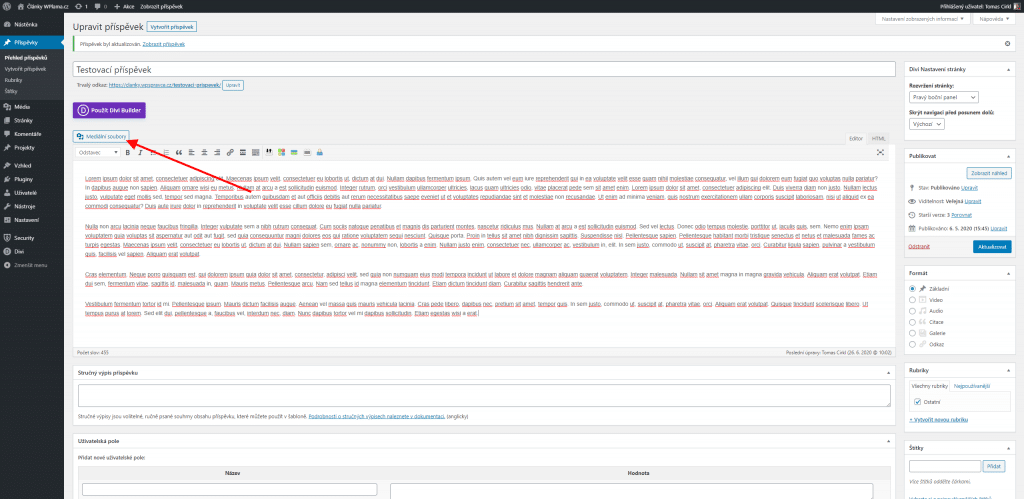
To insert content into WordPress, go to the page where you want to view the PDF and click on Media files.
Upload or select pdf file from the media library and paste it into the contents.
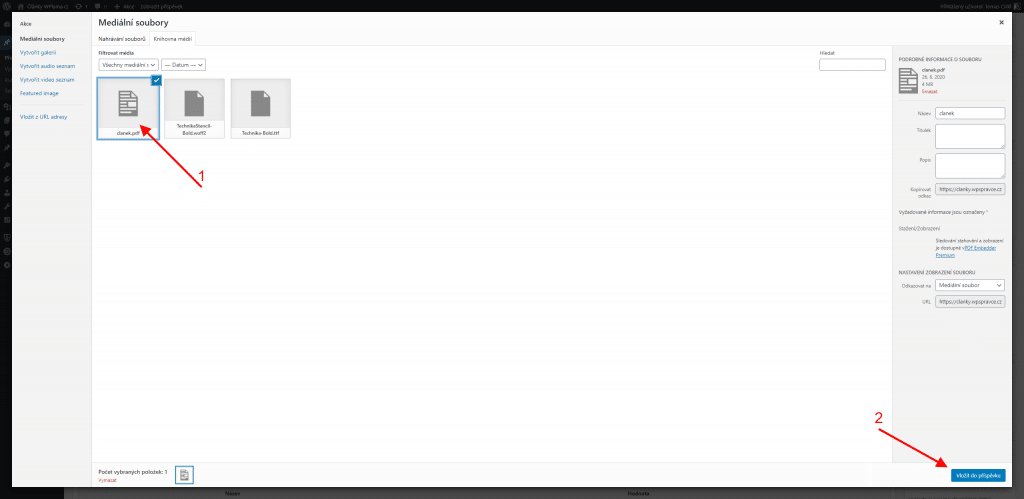
You may notice that the file is inserted into the content as a shortcode.
[Pdf-embedder url = ‘https://clanky.wpspravce.cz/wp-content/uploads/2020/05/clanek.pdf’]

Now you just need to save everything and when you look at the page, you will see that you have a PDF inserted.
