


How to create a subpage in WordPress

WordPress can create a hierarchical structure, that is, a page can have subpages. In this article, we will show you how to create subpages in WordPress.

What is a subpage?
Posts and pages are two different types of content. Posts should be part of a blog. They appear with the newest first and are organized using categories and tags.
Pages form separate content that is not part of the blog. Examples include About Us or Contact pages. Pages can be hierarchical, meaning you can set parent pages and child pages.
How to create a subpage?
To create a subpage, you must first create a parent page. If that is the case, you can continue.
First go to the WordPress administration to Pages → Create page. In the right column, find a box called Page Attributes.
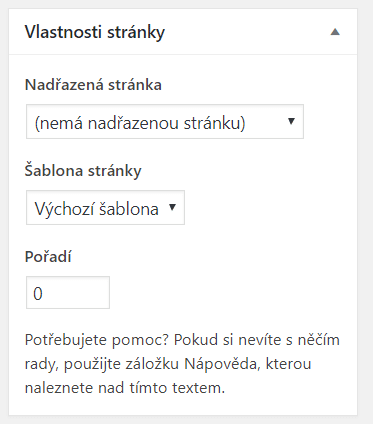
It contains a Parent page item. If you want to set the page you created as a subpage, simply select an existing page from the list and save everything.
Note that the URL of the subpage is changed and a slug of the parent page is inserted before the SLUG of the created page.
If you go to the list of all pages in the administration under Pages → All Pages, you can see the hierarchical structure displayed here too.

The hierarchical structure of pages in WordPress does not end at the first level. Sub-pages can also have other child pages set, etc. So you can work with the hierarchy as you need.
