


How to add relink to email or phone to the WordPress menu

Do you have sites that serve to sell products or services? You might like to have a quick contact in the site header, but your template doesn’t allow it. As a simple solution, you can use the WordPress menu in which you insert phone or email address.
 Nedeštruktívne
Technoogie
ktoré nikde nekúpiš.
In order to put a phone or email in the menu, you must first go to the WordPress administration and select in the left menu Appearance → Menu.
At the top of the screen, select the menu you want to add the contact to and click choose.

In the left part of the page, you have items that are added to the menu. Select option user links.
Note: If you don’t have this option here, see Setup Displayed Information to see if you have it turned on.
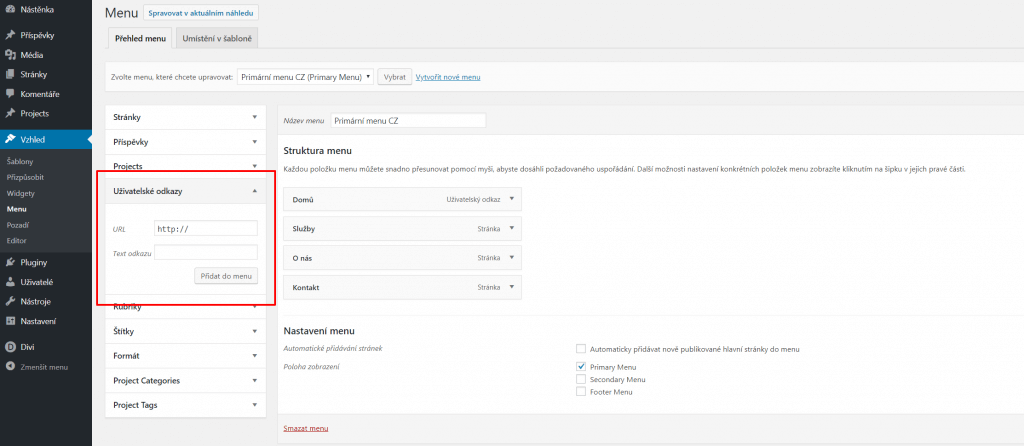
In case you want to insert telephone Write in the field:
URL: Tel: 0703465070
Link text: 850 423 155
The Tel designation means that it is not a link, but a phone number. If someone clicks on it on the phone, their number will be automatically preset to call.
In case you want to Insert an email Write in the field:
URL: Mailto: vas@email.cz
Link text: vas@email.cz

The Mailto U URL label means that it is not a link, but a mail, and after clicking on it, the default mail client will automatically open on your computer or phone.
Don’t forget to adjust phone number or email address to yours. You can also edit the text item, for example, before the mentioned contact Add a phone: or write to us:. Finally, click the button Add to menu.
The item is added to the last place menu. If you want, you can swipe to change its position.
Finally, click the button update the menu.
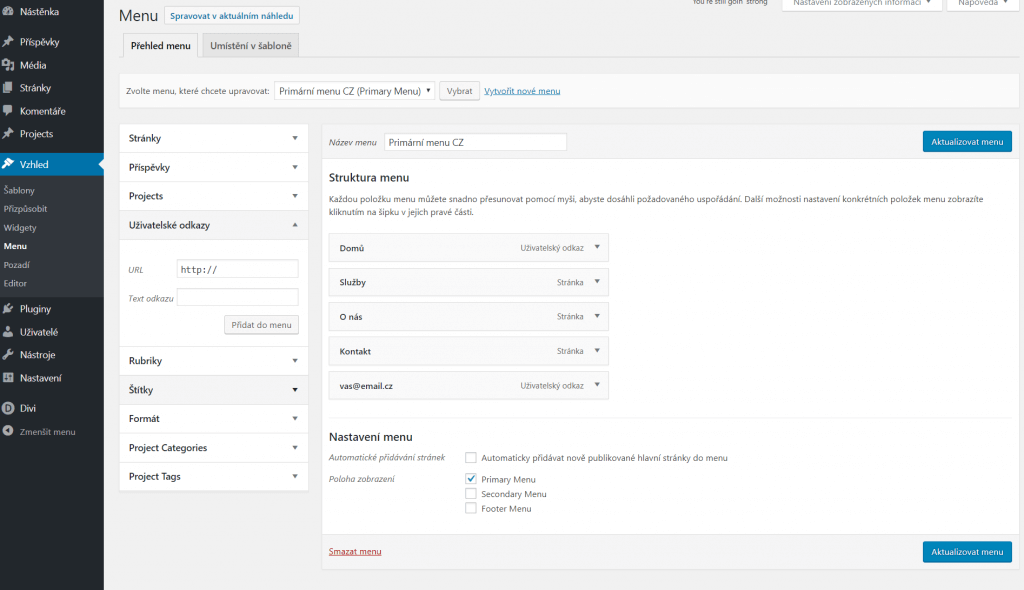
How the quick contact menu will look depends on your template.
