


An iPhone app shows detailed information about GSM base stations around you

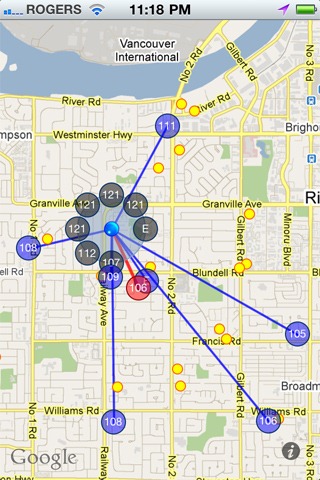 Signal is a new application available through Cydia for the iPhone 4, 3GS and 3G that displays detailed information about the GSM cells around you on a map. It is a handy little tool you can always carry with you to find the GSM base stations in your area.

The application is described as follows.
Signal is a tool created by iPhone Dev Team member planetbeing. It displays information about the cell or transmitter to which your iPhone is connected, including neighbouring GSM cells. It detects and maps the locations of all nearby cells so users can easily get a good idea of mobile coverage and see where their GSM phone is registering.
In addition to maps, useful technical information is available, including RSCP (signal strength) in dBm and Ec/N0 (signal quality) for all neighbouring base stations, the cells’ PSC values and each cell’s frequency.
So, the next time you are in town and want to learn more about your GSM operator, this application could be just the thing for you.
The application can display the positions of individual GSM base stations on a map for operators near the user, along with the signal strength from each BTS.
The application marks the currently used BTS in red, base stations with known locations in blue, and those whose locations are not yet known in grey. The author does not explain in the description how the application determines BTS locations.
The paid application costs $5 and is available from the Cydia App Store, an unofficial application store for jailbroken iPhones accessible through the Cydia application.
You can also try:
- How to jailbreak the iPhone 4, 3GS, iPod touch 3G/2G and iPad 3.2.1 with Jailbreak 2.0
- How to unlock iOS 4.0.1 on the iPhone 3GS and iPhone 3G [Guide]
- How to unlock iOS 4 with ultrasn0w and blacksn0w on baseband 05.13.04 [Guide]
- PwnageTool 4.0 (Windows)
Here is a video demonstration of the application:

BTS stands for base transceiver station: a base station that transmits and receives radio-frequency waves.
Mobile phones contain two-way radios — receivers and transmitters — that use radio-frequency signals to receive and transmit voice and data. When you make or receive a call, your mobile phone communicates with a network of low-voltage receivers and transmitters called base stations.
Each base station serves a small geographical area, forming one cell in the entire mobile system. The cells are linked together to create a single integrated mobile network. A typical BTS contains antennas and transmission equipment connected to the relevant control station. It is responsible for collecting telephone signals and transferring them.
Mobile phones can communicate with several base stations during a single call, maintaining the connection even while moving. Once a call is established, the mobile phone and BTS adjust their power to the minimum level required to maintain call quality. This adaptive power control makes the mobile system one of today’s most efficient communications systems.
The BTS network is also connected to the public telephone network, allowing mobile phones to call other networks, cities and countries worldwide.
A BTS can handle only a limited number of simultaneous calls. An average station can serve approximately 40–60 simultaneous voice and data signals.
When a call exceeds a BTS’s capacity, the signal is transferred to the nearest station. If that station is too far away or is also busy, the mobile phone temporarily displays a network error. If you have experienced this problem, the base stations around you may have been fully occupied at the time. Increased demand for mobile communication requires additional base stations.
