


How to Choose a GSM Signal Booster for Phone Calls and Internet at Home or Work

A modern signal booster should certainly offer:
Manual and automatic gain control: MGC/AGC/ALC, ASF
(MGC stands for Manual Gain Control, AGC – Automatic gain control, ALC Automatic power level control with adjustable coverage, Auto shut off function available for both uplink and downlink)

These automatic functions provide the following:
MGC — Manual Gain Control
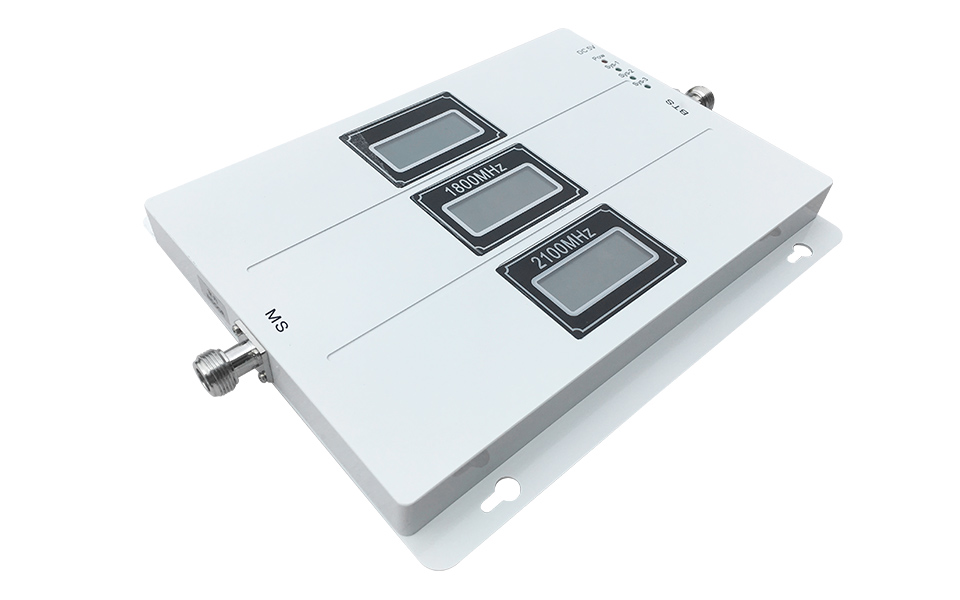
is a state-of-the-art technology for mitigating interference. The adaptive, innovative MGC mechanism allows users to adjust a mobile repeater’s gain manually. Simply press the “Increase (+)” or “Decrease (-)” button, and the internal MCU single-chip microcomputer immediately changes the booster’s gain and displays the current gain on the LCD.
An advanced MGC circuit design can significantly improve mobile call quality, reduce interference to the BTS mobile base station and avoid self-oscillation in the repeater system.
Automatic Gain Control — AGC
Automatic gain control, or AGC, also called automatic voltage amplification, is a feedback control circuit intended to maintain a controlled output signal amplitude despite changes in input amplitude. The average or peak output signal level dynamically adjusts the input-output gain to an appropriate value, allowing the circuit to operate satisfactorily over a wider range of input signal levels. It is used in most radio receivers to equalise the average volume of different stations despite differences in received signal strength, and to compensate for variations in one station’s signal caused by fading. Without AGC, the sound from an AM radio receiver would vary enormously between weak and strong signals. AGC effectively reduces the volume when the signal is strong and increases it when the signal is weaker.
How It Works
ALC — Automatic Power Level Control with Adjustable Coverage
ASF — Automatic Shut-Off Available for Both Uplink and Downlink
 A GSM booster is a system consisting of:
A directional outdoor antenna that receives the signal from the BTS base station.
A coaxial cable connecting the antenna to the signal booster.
The GSM signal booster itself.
A power supply unit.
An indoor omnidirectional antenna.
The external antenna is placed outside the house where it has the best view of the operator’s base station. The booster should be installed inside the house and connected to the indoor and outdoor antennas. The antennas should be as far apart as possible to avoid interference caused by amplifying the system’s own signal.
A mobile phone reception booster is a repeater system incorporating an amplifier that boosts reception or power in different directions. The outdoor antenna receives and transmits the signal from the tower or transmitter and passes it to the booster. Antenna gain is usually at least 7 dB and can exceed 10 dB. A coaxial cable connects the antenna to the booster itself. The booster’s main purpose is to take the existing GSM mobile phone signal from the antenna and amplify it. The amplified signal is then retransmitted into an area with no reception or a weak signal.
How a Mobile Phone Reception Booster Works
Operator signal boosters are used where mobile reception is weak. Mobile signal strength is usually affected by obstacles such as trees, building materials and hills, as well as distance. A GSM reception booster is designed for such locations. Mobile signal strength refers to the strength, measured in dBm, of the signal sent by the mobile network to the phone. First, the outdoor antenna picks up the mobile signal. The booster then amplifies it and distributes it around the building through an indoor antenna. The result is stronger reception even in more remote parts of the house. You can then enjoy clearer calls, faster web browsing and faster data downloads and uploads.
This is how a mobile phone signal booster works in your office or home. The same principle applies to boosters on all network technology platforms, including GSM, CDMA, TDMA, EVDO, UMTS, HSPA+ and the latest LTE. Voice and data performance on 2G voice, 3G data and advanced 4G LTE networks is improved according to the booster selected.
 Another benefit of a stronger signal is that the mobile phone’s battery life can increase by a few days. You can choose a mobile booster that simultaneously increases signal strength for different phones. Signal strength refers to the magnitude of the electric field at a reference point some distance from the transmitting antenna. It is also known as field strength or received signal level. When you talk on your phone, it converts your voice into electrical signals and transmits them as radio waves. The other person’s phone converts the electrical signals back into sound they can hear. Any mobile signal booster for a home, car or boat works by amplifying this transmission.
Signal Strength
The mobile coverage at the location where you plan to install the outdoor antenna determines the total indoor area that can be covered, for example in an office or home. If outdoor reception is strong enough, you can easily cover an area roughly equal to the repeater’s stated coverage. With a weaker outdoor signal, however, the indoor area covered will be smaller than the repeater’s specification. You can also use your phone’s display to assess coverage strength and estimate the best position for the external antenna.
How to Choose the Equipment
Before buying a GSM or mobile internet booster, study its specifications carefully. No device is ideal for everyone, because the conditions in which you will use it are unique. What works well for your neighbour may not suit you, and vice versa.
When choosing equipment, first consider:
The supported frequency range. Most mobile operators work with GSM 900, CDMA and UMTS (3G) standards, which domestic booster manufacturers take into account.
The distance from your cottage to the nearest base station. You can establish this by calling local operators or using programs that show station locations on a map.
Three examples of Android applications are Antennas, Network Cell Info Lite and OpenSignal 3G/4G/Wi-Fi coverage maps. The closer the BTS station is to the house, the better the GSM signal improvement you can achieve. Stations 10–15 km away cannot be taken into account. If your operator’s tower is fairly distant, you can buy another company’s SIM card or choose a different mobile operator. In general, the output of any device for a country house should be at least 100 mW.

The operator’s signal at the proposed antenna location must show at least one bar on a mobile phone. You can easily determine it using a phone with a SIM card or a laptop with a connected 3G/4G modem and its management software. Another option is Mobile Data Monitoring Application (MDMA), which gives more accurate results and supports almost all 3G modem models. You will need the same tools to configure the antenna and choose the booster’s location inside the house.
The house’s floor area and wall materials. These matter when selecting the indoor booster’s power and its antennas’ range. For a house with more than 2 rooms and brick walls, the indoor antenna gain should be at least 3–5 dB.
Other Points to Consider When Choosing a Booster:
If you have never installed such equipment manually, choose a unit that controls the gain system automatically.
The coaxial cable connecting outdoor and indoor modules, or the antenna and modem, should not be unnecessarily long. The shorter it is, the better the signal. The optimal cable length is up to 5–6 metres, although if the manufacturer supplies a longer cable, the equipment’s capabilities allow for it.
Some manufacturers state on the box that the included cable has an impedance of 50 ohms, presenting this as an advantage. In reality, this is pure marketing. Losses in 50-ohm and 75-ohm cables are almost the same, but the latter is much cheaper.
Installing GSM boosters and outdoor antennas for internet boosters is usually straightforward, especially since almost all come with installation and configuration instructions. The hardest part may be climbing onto the roof, because the higher the antenna, the less interference there is.
The outdoor antenna should point towards the base station. The optimal position of the booster and indoor antennas is determined experimentally using the signal level on the phone, but they should not be more than 3 metres from the outdoor antenna.
Simple desktop 3G/4G boosters are best used near a window on the side facing the tower. Position the unit so the modem faces in that direction. Installation Steps
Step 1. Take your phone onto the roof or to another outdoor location to find where the signal is strongest.
Step 2. Temporarily mount the outdoor antenna there. You may need to adjust or move it later.
Step 3. Run the coaxial cable into the building to a convenient location, such as an attic, where standard mains power is also available for the signal repeater.
Step 4. Place the signal repeater in this location and connect the coaxial cable between the repeater’s outdoor port and the outdoor antenna.
Step 5. Install the indoor antenna in a suitable location. You may need to adjust or move it later. Further notes on indoor antennas and patterns are available here.
Step 6. Connect a coaxial cable between the indoor antenna and the signal repeater’s output port.
Step 7. Switch the system on and check the signal inside the building. If necessary, tune the system by moving or reorienting the outdoor and indoor antennas until you obtain the strongest possible signal.
Step 8. Secure all antennas and cables, mount the signal repeater firmly and tidy the installation.
The outdoor antenna must not point at the indoor transmitting antenna! This would create feedback and amplify the system’s own generated signal.
A 5-band GSM booster has also appeared on the European market, covering:
CDMA800, EGSM, DCS, WCDMA, LTE2600:
LTE800 UPLINK: 832-862MHz Downlink: 791-821MHz
EGSM900 UPLINK: 880-915MHz Downlink: 925-960MHz
DCS/LTE1800 UPLINK: 1710-1785MHz Downlink: 1805-1880MHz
WCDMA2100 UPLINK: 1920-1980MHz Downlink: 2110-2170MHz
LTE2600 UPLINK: 2500-2570MHz Downlink: 2620-2690MHz
Unfortunately, its price is still quite high…
Customer Experiences:
As I always say: if the incoming signal is sufficient, at least enough to make a call, there should be no problem after GSM amplification. If you cannot make a call at the input, there is nothing to amplify, in either direction.
Customer:
Calls are still dropping after the GSM booster was replaced. Employees even complain that calls drop more often than before the replacement. I would therefore like to ask how we should proceed to resolve the problem. I witnessed it myself: during one conversation, the call dropped 3 times. You will agree that we cannot work under these conditions.
Market.sk:
Try the following:
Switch off the GSM booster and try calling a free helpline or a landline while standing directly beside the outdoor antenna. The call must be clear and free of dropouts, regardless of signal strength.
Go to the indoor GSM antenna and try making a call. It should not be possible, or only barely possible. If you can already make a call, your mobile operator may have installed a nearby GSM cell, so you practically do not need a GSM booster.
If you can make a call beside the indoor antenna but the signal is unsatisfactory, still with the booster switched off, place the indoor antenna where you simply cannot make a call. If the phone cannot choose the correct GSM cell, it starts switching, causing interruptions during calls. Poorer GSM phones in particular keep switching.
If this test works but the GSM booster still causes problems, use only the original coaxial cables: 10 m directly from the antenna and 5 m to the indoor antenna. Everything should work properly.
If you cannot make a call beside the outdoor antenna with the booster switched off, there is no point doing anything further: a GSM booster will not help.
The GSM indicator on the booster must remain green. If it occasionally flashes red, the maximum feedback protection has activated, which is fine. If it stays red, the indoor and outdoor antennas have reached maximum feedback. Point the outdoor antenna in the opposite direction from the indoor antenna.
A faulty coaxial cable or GSM booster also causes the indicator to stay red. GSM protection is working at maximum, so amplification is at its weakest. When extending any coaxial cable, test for short circuits and check it with a megohmmeter. The cable must be fully functional, and its total length should not exceed 30 m.
Customer:
Do you already have equipment for 3G internet, or for other bands?
Market.sk:
Yes, the unit is in test operation. We are fine-tuning stability and waiting only for the mounting enclosure to arrive and the modules to be installed. It already works in the 3G band, at frequencies up to 1900–2100 MHz, so mobile internet in the 3G band is possible. Special Lucent Yagi antennas are supplied with the unit, and their coaxial cables cannot be extended arbitrarily.
As for other frequency bands, we can custom-build virtually anything in the field of RF technology.
Customer:
I have adjusted it, but I am not entirely satisfied.
I aligned the directional antenna and picked up a signal. With the phone right beside the transmitting antenna, I had full signal, but…
I could not make calls. It displayed “out of network coverage” or “unable to establish a connection”. I tried all weekend. When I did manage to call, it was choppy and communication was practically impossible. A text message only went through on the tenth attempt.
The phone had a signal only within about 1 m of the transmitting antenna. A metre away, it showed just one bar and the signal disappeared, never mind establishing a connection. Apparently, the signal is insufficient to use this equipment.
When I arrived at the cottage on Friday, Orange technicians were measuring the signal at another cottage a few properties away. I asked them to measure mine too. They measured -90 dB and immediately told me it was far too weak for further distribution.
I am going back to the cottage tomorrow to try another position for the directional antenna, and then we will see what to do next.
 Market.sk:
From your description, it does look like a weak outdoor signal. The only option is a better antenna position, such as a mast.
…the signal is very weak or fluctuates considerably, for example far from a BTS. There is effectively “nothing to amplify”, so a usable GSM signal does not reach the building’s interior.
Customer:
Thank you. I can serve as a reference: it is excellent. Please send me another set, along with an invoice by email and post.
I will pay the same amount as before this evening.
I need the second unit for home, where we have the same problem.
Customer:
In the room where I have the amplified signal brought in from outside, reception is good only within 4 m of the antenna. Beyond that there is no signal. Should I change the switches?
Market.sk:
Do not change those switches. Their purpose is to introduce attenuation when the red LED lights up, meaning that the system is amplifying its own transmitted signal.
We recommend positioning the outdoor Yagi antenna with vertical polarisation, with its rods upright, and pointing it towards the nearest GSM transmitter.
Shorten all coaxial cables. Add more antennas in the room using a T-splitter to cover its full length. Your room may absorb RF signals, producing greater attenuation than a normal building.
Coaxial T-splitters and connectors are readily available from specialist shops.
To begin with, point the outdoor antenna towards the strongest signal. Then, if necessary, shorten the coaxial cables or add another antenna in the room.
Customer:
I installed the booster, although I had to shorten the output cable. It works better than before: we can make calls from the room, though only about a metre from the antenna, and the person being called misses some words. This is probably caused by fluctuating and insufficient incoming GSM signal, as you mentioned. But it is better, and I hope the customer is satisfied for now. Once again, I apologise for the late payment. Next week I will contact you personally about another job. Thank you for your patience and understanding. Kind regards.
Market.sk:
If the signal beside the indoor antenna is weak, it may be worth replacing the outdoor antenna with a better 15 dB model and finding a stronger signal so calls are not interrupted. Once you have aligned the outdoor antenna, you are done…
Also, if the 5 m coaxial cable to the indoor antenna is unnecessarily long, use an RF N/m–N/m adapter instead. This connects the booster directly to the indoor antenna without coaxial cable losses. In our tests, calls can normally be made 15–30 m from the antenna. We test in a civil defence shelter with 1 m thick walls and no GSM signal at all! Outside the shelter, a GSM phone shows four bars. Again, the better the incoming GSM signal, the better the outgoing signal. Where there is no GSM signal, amplification will not create one…
Customer:
The signal was very weak in the area where we tested your equipment. Even the outdoor antenna did not help, despite trying various positions and directions.
The unit did amplify the input, but because it was very weak or noisy, the output was unusable.
In practice, even though the phone showed a strong signal inside the room, calls could not be made, or occasionally worked with dropouts.
We therefore cannot judge whether the unit works exactly as it should.
The solution did not work for us for objective reasons, namely a very weak input signal, but we believe a normal incoming signal would allow the whole room to be covered without difficulty. Thank you for lending us the antenna.
We will send it back this week.
Customer:
I wanted to let you know that your parcel arrived safely. However, while unpacking it, I noticed that the equipment had clearly been used. I also noticed a broken seal directly on the booster’s casing.
Nevertheless, we tested the unit and are completely satisfied with its specifications. It meets our requirements.
I just wanted to know whether this would cause a problem with a possible warranty claim.
Thank you in advance for a prompt reply.
Market.sk:
No problem: we can supply a completely new, unscratched unit. However, they are all identical imports from third countries. We modify the receiving section for greater stability and fine-tune the VCO section, so it is practically “our equipment”, if we may put it that way…
Warranty claims are no problem. We place our seals inside, and we can proudly say there has not been a single claim so far. If a unit worked initially, it still works today.
It certainly was not used; we do not stock used units. It may have proved unsuitable during testing by a previous customer with a weak signal, in which case we accept returns within 10–20 days…
We are glad it is working properly for you.

Customer:
If there will be no problem with warranty claims, we do not insist on replacing the equipment.
However, I would also like to order an extension cable for the external antenna, roughly 5 metres long.
You can send it by post; a courier is unnecessary. Thank you in advance for processing it promptly.
Customer: One operator works fine, but the other is very weak
Market.sk: The booster is designed to work simultaneously across the entire frequency band, GSM, DCS or UMTS, as a broadband amplifier. If it is installed in a band used by two providers, with one base station tens of metres from the booster and another several kilometres away, the nearby station’s signal is much more dominant. Often one operator has a much stronger signal at the location than another, but the booster amplifies that signal too.
ALC then activates automatically and reduces gain by up to 35 dB. This also reduces the gain of the distant station’s signal, from a maximum of 70 dB (AT-700) or 75 dB. In this case, use a directional antenna and install it pointing away from the nearer station to minimise mutual interference. You can also choose another booster with lower gain and output.
What Is the Difference Between 3G and 4G?
Answer: 3G handles calls, texts, email and basic internet use. 4G provides all 3G functions plus fast internet. Data-intensive applications and programs such as YouTube, Netflix, Pandora, Spotify, Facebook, Google Maps and Google Chrome need substantial bandwidth, making 4G speeds more suitable. The GSM WT-G10 signal booster works only at 900 MHz. We have boosters for GSM, 3G and 4G, such as a tri-band 900/1800/2100 MHz model. Please contact us for more information.
Question: Does the GSM Signal Aerial Booster 900MHz work with one carrier at a time, or does it boost all operators simultaneously?
Answer: Yes, it supports all operators working at 900 MHz.
Market.sk Recommends This Application for Testing GSM Signal Quality:
Network Cell Info & WiFi by M2Catalyst, LLC.

 Network Cell Info & WiFi by M2Catalyst, LLC.
Application Description
Network Cell Info is a comprehensive mobile network and Wi-Fi monitoring app with measurement and diagnostic tools for 5G, LTE+, LTE, CDMA, WCDMA and GSM. It can help resolve reception and connectivity problems while keeping you informed about your local mobile operator’s radio-frequency environment.
📡Main Features📡 :
☆ Near-real-time (1-second) monitoring of mobile operator and Wi-Fi signals in the Gauge and Raw tabs (*)
☆ Support for 5G, LTE+, LTE, IWLAN, UMTS, GSM and CDMA
☆ One-tap Wi-Fi/mobile internet speed test: download, upload, ping and jitter
☆ Dual-SIM support (*)
☆ 2–3 signal meters for SIM cards and Wi-Fi (*)
☆ Signal graphs for up to 2 cells
☆ Band number (*)
☆ SIM preference option for tabs other than Gauge
☆ Map with mobile network information and signal meters
☆ History logs and mobile signal measurements in the Map tab
☆ Cell locations, not operator tower locations, shown on a map using Mozilla Location Service (MLS), excluding CDMA (*)
☆ Personal Best Signal Finder map layer shows your signal strength history by location
☆ Crowdsourced Best Signal Finder shows your operator’s nearest best signals
☆ Personal Best Signal Finder history shows your signal strength over time
☆ Route colouring on the map according to signal strength, with map markers showing location and signal information
☆ Measurement settings, including minimum distance, minimum accuracy and motion sensor
☆ Export historical measurement databases in KML 2.2, MLS Geosubmit v.2, CLF v.3, OpenCellID CSV and CMWF formats
☆ Network information in the status bar
☆ Raw view of the operator’s mobile network information
☆ Connection statistics for 2G/3G/4G/5G
☆ SIM and device information
Manual: https://m2catalyst.com/apps/network-cell-info/manual
